Search, Filter, Select
For models having a lot of parts and assemblies 3D-Tool offers helpful features to search parts in the Model Tree, to filter the parts in the Model Tree and to select parts by a search term.
The functions to search, filter and select parts are located in the right side panel above the Model Tree.
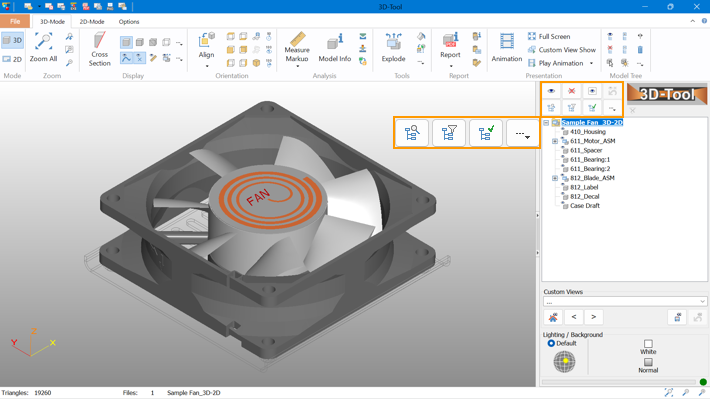
 Search in Model Tree
 Filter Model Tree
 Select in Model Tree
 Search in Model Tree

Search for parts or assemblies in the Model Tree.
Enter a search string and click the Next button to search in the Model Tree downwards for the next part which contains the search string in the name.
The Previous button reverses the search and searches upwards in the Model Tree.
- Include assemblies: Searches also in the names of assemblies.
- March case: Considers the case-sensitivity during the search.
- Regular expression: Use search string as regular expressions.
 Filter Model Tree
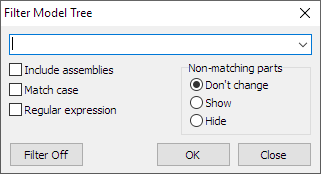
Filter the parts and assemblies in the Model Tree.
Enter a search string and click OK.
Only parts which contain the search string in the name are displayed in the Model Tree.
In order to return to the unfiltered view of the Model Tree, click on  Model Tree Filter off in in the right info panel above the Model Tree. Or, open the
  Filter Model Tree tool again and click on the Filter off button.
- Include assemblies: Searches also in the names of assemblies.
- March case: Considers the case-sensitivity during the search.
- Regular expression: Use search string as regular expressions.
Non-matching parts
Here you specify how the filtered Model Tree affects the view of the model.
- Don't change: Don't change the visibility of parts not matching the filer criteria.
- Show: Show all parts not matching the filter criteria.
- Hide: Hide all parts not matching the filter criteria.
 Select in Model Tree
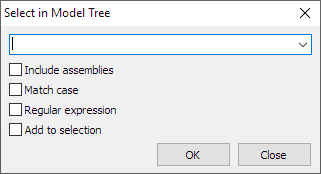
Use a search string to select parts or assemblies in the Model Tree.
Enter a search string and click OK.
Only parts which contain the search string in the name are displayed in the Model Tree.
Now you can apply more Model Tree functions to the selection, such as: Show, Hide, Show Selection Only, Transparency.
- Include assemblies: Searches also in the names of assemblies.
- March case: Considers the case-sensitivity during the search.
- Regular expression: Use search string as regular expressions.
- Add to section: Add findings to the current selection. If parts are already selected in the Model Tree, the selection remains and the new findings are added to the current selection.