 3D - Publish / Export
Default settings for publishing and saving data.
Options tab > Preferences group >  Preferences > 3D - Publish/Export.
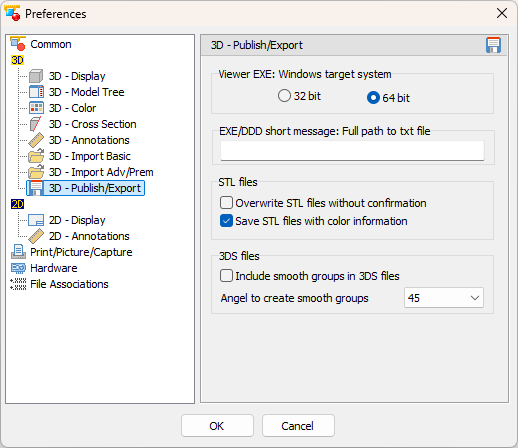
Viewer EXE: Windows target system
- 32 Bit
Create a 32 bit executable viewer. - 64 Bit (Default: Active)
Create a 32 bit executable viewer.
EXE/DDD short message: Full path to txt file (Default: Empty)
Enter the path and file name of a text file (*.txt) that is used as short message for publishing every time an EXE/DDD file is published. The text is limited to 2000 characters and can be edited before the file is published.
STL files
- Overwrite STL files without confirmation (Default: Inactive)
When saving models as STL files overwrite already exiting files without any warning. - Save STL files with color information (Default: Active)
Save the colors of the model with STL files. The files can be used with any other program. But since there is no standard of STL colors, the colors may not be displayed correctly.
3DS file
- Include smooth groups in 3DS files (Default: Inactive)
When 3DS files are saved, create smooth groups based on the angle set in Angle to create smooth groups. (Default 45)