 3D - Import Advanced/Premium
Default settings used with the advanced and premium 3D import.
Options tab > Preferences group >  Preferences > 3D - Import Adv/Prem.
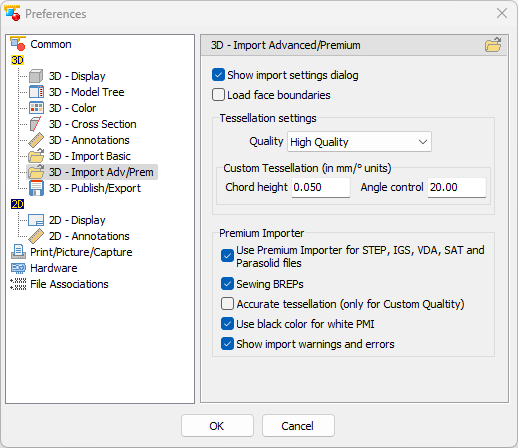
Show import settings dialog (Default: Active)
Show the import settings dialog when loading 3D-CAD files.
Load face boundaries (Default: Inactive)
When loading models, load their face boundaries as curves.
Tessellation settings (Default: High Quality)
Use one of the following presets for the tessellation settings in the import settings dialog.
- Custom
- High Quality
- Medium Quality
- Low Quality
- CAD Graphical data
Custom tessellation settings
Set the values for the Custom preset in the import settings dialog.
- Chord height (Default: 0,05 mm / 0.002 inch)
Enter a value for the chord height. - Angle control (Default: 20)
Enter a value for the angle control.
Premium-Importer (3D-Tool Premium only)
- Use Premium-Importer for STEP, IGS, VDA, SAT and Parasolid files (Default: Active)
Use the Premium Importer with STEP, IGS, VDA, SAT, and Parasolid files.
Otherwise the Advanced Importer will be used with these files. - Sewing BREPs (Default: Active)
Enables sewing operations on BREPs. - Accurate tessellation (only for Custom Quality) (Default: Inactive)
Activates accurate tessellation for models imported with Custom Quality setting. This is an organic tessellation which usually results in watertight models, but generates more triangles. - Show import warnings and errors (Default: Active)
After loading, shows import errors and warnings, e.g. missing parts and information on non-supported formats. - Use black color for white PMI (Default: Active)
During import, change the color of white colored product manufacturing information to black to increase their visibility