 2D - Annotations
Default settings of new 2D Annotations and Dimensions.
Options tab > Preferences group >  Preferences > 2D - Annotations.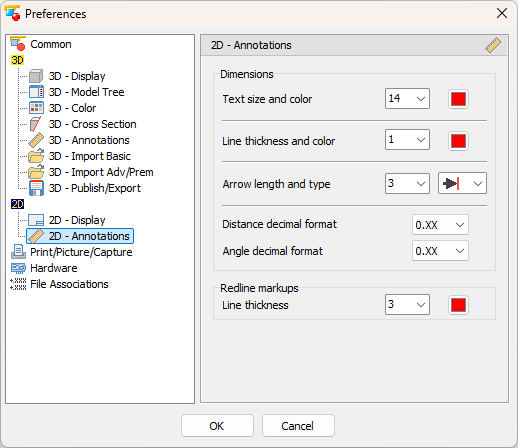
Text size (Default: 14)
Choose the text size of new Dimensions.
- Color (Default: Red)
Choose the text color of new Dimensions.
Line thickness (Default: 1)
Choose the width of lines of new Dimensions.
- Line color (Default: Red)
Choose the color of lines of new Dimensions.
Arrow Length (Default: 2)
Choose the length of an arrow head of new Annotations and Dimensions.
- Arrow type (Default: inner triangle)
- Choose the arrow head of new Dimension.
Distance decimal format (Default: 0.XX - 2 places for mm, 0.XXX - 3 places for inch)
Choose the number of decimal places used with newly measured distances.
Angle decimal format (Default: 0.XX - 2 places)
Choose the number of decimal places used with newly measured angles.
Redline markups
- Line thickness (Default: 1)
Choose the width of new redline markups. - Color (Default: Red)
Choose the color of a new redline markups.