 Drag'n Trans (not available with the Free Viewer and in EXE files)
Use this tool within the RP Layout and the Placement tool to easily move and rotate models with the mouse.
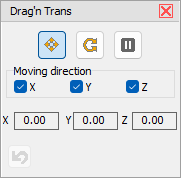
 Move parts
Left-click on the selected model and hold down the mouse button to move the model.
The x, y, and z-values of the translation and the position of the model center are shown while the model is moved.
To make moving the model easier, deselect one or two directions for the moving (x, y, z) under Move direction.
 Rotate part
Choose the x, y, z, or the virtual axis of the screen as rotation axis.
Left-click on the model and hold down the mouse button to rotate the model.
The angle of rotation is displayed while the model is rotated.
 Don't move/rotate parts
Prevent the parts from being accidentally moved or rotated if you move or rotate the model in the view.
 Undo
Undo
Undo the last movement/rotation.
 Note
Note
The transformation of parts (move, rotate, scale, mirror) can lead to major changes in Custom Views that have already been created.