 Move
Move
Use the Move tool to move models, assemblies, and parts.
The Move tool is located in  More in the Tools group of the 3D-Mode tab.
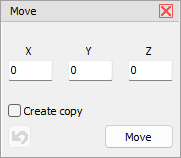
Model Tree Selection
Select a model, an assembly, or a part in the Model Tree.
x, y, z
Enter the value of the movement in the x, y, and z input field.
Create copy
Create a copy of the selection, and move it.
Move
Execute the movement.
 Undo
Undo
Undo the last movement.
 Note
Note
The transformation of parts (move, rotate, scale, mirror) can lead to major changes in Custom Views that have already been created.