Measure Distance, Angle, Edge, Boundary Box, Wall Thickness and Clearance
Measure distances, angles, edges, boundary boxes, wall thickness, and clearances.
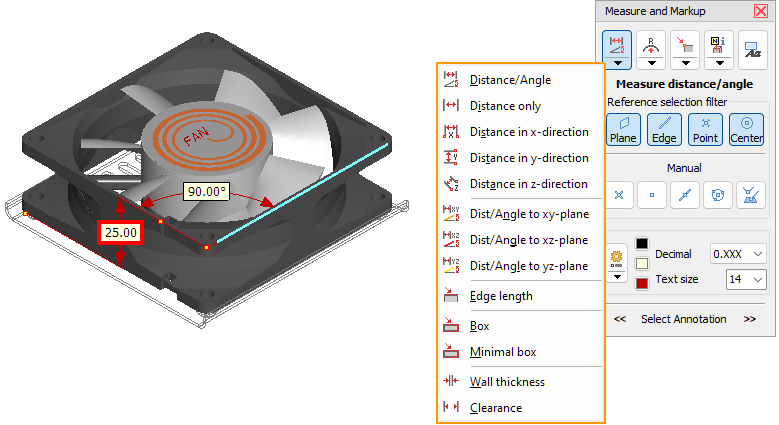
Click the  Measure/Markup tool in the Tools group. Click the
  Distance/Angle button to measure distances and angles or click the little black arrow in the button to select another measure function.
 Picking References For Dimensions
Distance in X, Y and Z-Direction
Distance/Angle to XY, XZ, ZY-Plane
Picking References For Dimensions
Auto-selection
Move the cursor across the model and possible references will be shown in light blue. Click to select a reference. After the references required for a measurement have been selected, the 3D dimension will be created.
Selection filter
For dimensions with two references, the automatic selection of the references can be adjusted with the Reference selection filter: Plane
Plane Edge
Edge Vertex
 Center (Center of circle)
All four filters are active by default. If references are close together, the selection may be difficult. Deactivate all filters that are not needed.
Manual selection of references
References for measuring distances can also be points and centers of circles that are not supported by the automatic selection. Or points on edges or intersections.
 Reference point
Select an available reference point as measuring reference.
 Point
Point
Select a free point on the model.
 Point on edge
Select an edge and use its center as a measuring reference.
 Center (Center of circle)
Select three points to determine a circle and use its center as a reference.
 Intersection of two edges or edge and plane
Select two edges or one edge and a plane and use their intersection as a measurement reference.
Undo a selection
Remove an erroneously selected reference by clicking the button of the measure function again or by pressing [Esc].
Distance/Angle
Measure the distance or the angle between two references based on the type and location of the references.
|
Combination |
Measure |
|
|
|
|
Measures distance when the planes are parallel. |
|
|
|
Measures distance when they are parallel. |
|
|
|
Distance of the vertex perpendicular to the plane. |
|
|
|
Distance of the center of the circle perpendicular to the plane. |
|
|
|
Measures distance when the edges are parallel. |
|
|
|
Distance of the vertex perpendicular to the edge. |
|
|
|
Distance of the center of the circle perpendicular to the edge. |
|
|
|
Distance of the vertices |
|
|
|
Distance of the vertex to the center of the circle. |
|
|
|
Distance of one center to the other center of a circle. |
 Distance
Measure the distance between two references. Only references that can be used for distance measurement can be selected.
 Distance in X-,
  Y- and
  Z-Direction
Measure the distance between two references along the axes of the coordinate system. Only references that can be used for distance measurement can be selected.
 Distance/Angel to XY,
  XZ- and
  YZ-Plane
Measure the distance or the angle between a reference and one of the standard planes based on the type and location of the reference.
|
Combination |
Measure |
|
|
Standard plane |
|
Measures distance when they are parallel. |
|
Standard plane |
|
Measures distance when they are parallel. |
|
Standard plane |
|
Distance of the vertex perpendicular to the plane. |
|
Standard plane |
|
Distance of the center of the circle perpendicular to the plane. |
 Edge Length
Measure the length of an edge.
 Boundary Box
Measure the extension of the model in the X, Y and Z direction within the coordinate system.
Activate Boundary box of a part to measure the extension of parts in the X, Y and Z direction within the coordinate system.
The model or part under the cursor will be shown in light blue.
Minimal Box
Measure the length, width, and height of a model despite its position in the coordinate system.
Activate Boundary box of a part to measure the length, width, and height of parts despite their position in the coordinate system.
The model or part under the cursor will be shown in light blue.
 Wall Thickness
Measure the wall thickness at any point on the model. The wall thickness is calculated perpendicularly to the surface at the measuring point and independent of the viewing angle. Measuring points under the cursor will be shown in light blue.
 Clearance
Measure the clearance between any point on the model and the surface that is across from it. The clearance is calculated perpendicularly to the surface at the measuring point and independent of the viewing angle. Measuring points under the cursor will be shown in light blue.