 Common
Common default settings such as the program language and the default units.
Options tab > Preferences group >  Preferences > Common.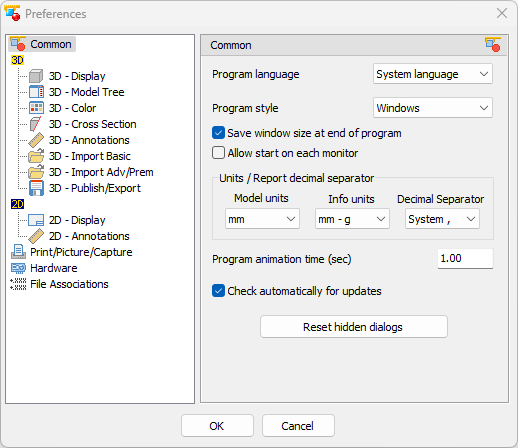
Program language (Default: System language)
Select one of the available languages for program start-up. Choosing System language will start 3D-Tool in the system language of Windows, if available, otherwise in English.
Program style (Default: Windows 10)
Specifies the color style of the 3D-Tool program interface.
- Windows
- 3D-Tool Dark
- 3D-Tool Slate
- 3D-Tool Gray
- 3D-Tool Light
 Note
Note
For the Free Viewer and 3D-Tool EXE files only the Windows Style is available.
Save window size at end of program (Default: Active)
When closing 3D-Tool, save the window size and position for the next program start-up.
Allow start on each monitor (Default: Inactive)
By default a 3D-Tool window will start up on the primary display of the computer. Set this option if you want 3D-Tool to start up on the display on which the last 3D-Tool window had been closed.
Model units (Default depends on Windows settings at time of installation: mm for metric, inch for US system units)
Set the modell units of measurement (mm or inch).
Models of the following files will be scaled to the 3D-Tool default units during import:
- STEP, IGES, VDA, SAT, JT and PARASOLID.
- Native files from CATIA, Creo, ProE, Autodesk Inventor, Autodesk Navisworks, I-Deas, UG/NX, Rhino, Solid Edge and SolidWorks
Triangulated 3D models (STL, SLP, VRML, etc.), 3D-Tool models (DDD, EXE) and 2D drawings, do not contain information on the units used and will be imported without scaling.
If the units of the model or the drawing deviate from the standard 3D-Tool units, this may lead to unexpected result for the following functions:
- Incorrect assignment and conversion of the units in the Model-Info tool.
- Inappropriate specification of the Edge length for the Wall Thickness Analysis.
- Too small or large Text height of 2D dimensions and 2D texts.
In this case, change the 3D-Tool model units to the units of the file.
Info units (Default: mm - g)
Are the defined units for reports, notes, copy to Clipboard and for the Model Info tool.
Decimal Separator (Default: System)
Set the decimal separator for reports and the copying to Clipboard.
Program animation time (Default: 1.00)
Set the time in seconds for:
- The animation of the 3D view, e.g. when Custom Views or standard views are selected.
If a 0 is entered, there will be no animation. - The transition time of new key frames in the Animation tool.
Automatically check for updates (Default: Active)
During the program start-up, check if there is a new program version. You will receive an according message. Download and install new versions from www.3D-Tool.com.
Reset hidden dialogs
Reset all dialogs that are hidden, by selecting Don't show this message again.